
An Active Directory home lab gives cybersecurity beginners practical experience with the identity systems attackers frequently target and defenders must protect. By building a Windows domain, managing user permissions, applying Group Policy, and investigating authentication events, you can develop skills relevant to SOC analyst jobs, identity security careers, and security engineering. This guide walks through a reproducible beginner cybersecurity lab, including installation commands, security configuration, detection exercises, troubleshooting, and portfolio evidence that helps demonstrate genuine technical competence.
1) Plan Your Active Directory Home Lab: Hardware, Network, and Security Objectives
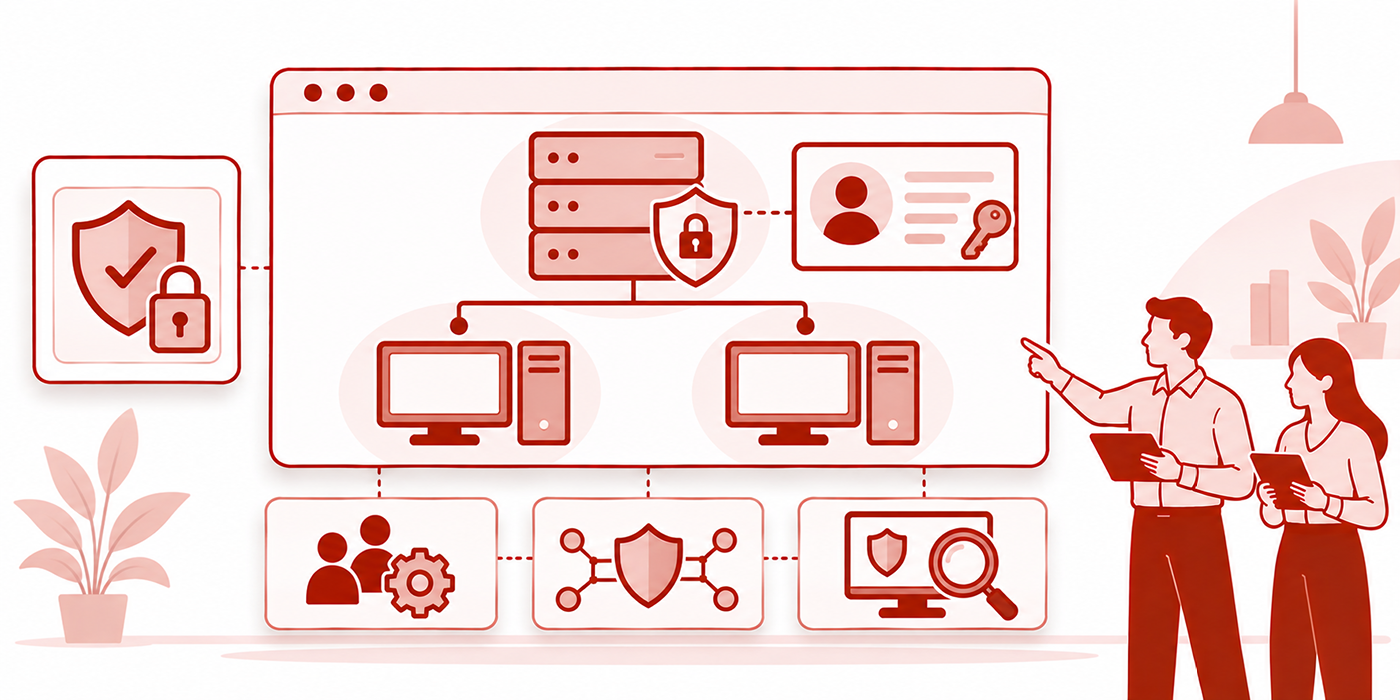
Active Directory Domain Services (AD DS) centrally manages users, computers, authentication, and access to organizational resources. Domain controllers maintain the directory and provide services that allow domain-joined devices to locate accounts, authenticate users, and apply centrally managed policies.
Understanding these relationships is valuable for candidates pursuing cybersecurity without prior IT experience. It also strengthens the networking and troubleshooting knowledge commonly developed during a help-desk-to-cybersecurity transition.
Hardware and Software Requirements
For a practical beginner environment, use a host computer with approximately 16 GB RAM, SSD storage, and hardware virtualization support. A machine with 24–32 GB RAM provides more flexibility when operating several virtual machines simultaneously.
A suggested configuration is:
Domain controller (DC01): Windows Server 2025 evaluation, 2 virtual CPUs, 4 GB RAM, and 50 GB virtual disk.
Windows workstation (CLIENT01): Windows 11 Pro or Enterprise, 2 virtual CPUs, 4 GB RAM, and 50 GB virtual disk.
Optional monitoring machine: A separate VM for Splunk, Wazuh, or Elastic, sized according to its installation requirements.
The 4 GB server allocation is a starting point for a small teaching lab; additional memory may be necessary for smoother administration or expanded workloads. Avoid running every VM simultaneously when host resources are limited.
Microsoft offers a Windows Server 2025 evaluation edition with a 180-day evaluation period. The evaluation must be activated within its initial activation window. Use properly licensed or authorized evaluation software for the workstation.
Windows 11 Home cannot join a traditional on-premises Active Directory domain. Use a supported Pro, Enterprise, or Education edition.
Candidates preparing for entry-level cybersecurity employment can begin with the two-machine configuration and expand when their technical portfolio projects require additional telemetry.
Design a Safe Virtual Network
Create a dedicated host-only virtual network with the following example configuration:
Network: 192.168.56.0/24
Domain controller: 192.168.56.10
Workstation: 192.168.56.20
Internal AD domain: ad.lab.test
NetBIOS domain name: ADLAB
The .test top-level domain is reserved for testing, making it appropriate for an isolated lab. Use the same example domain consistently throughout the project.
Configure the domain controller to provide DNS for the lab and point the workstation's preferred DNS server to 192.168.56.10.
Keep the lab isolated from your home or office production network. If internet access is needed for Windows updates or downloads, temporarily provide a controlled connection and remove unnecessary exposure afterward. Keep the default gateway blank on the host-only interfaces when the lab has no routed internet access.
This network design supports beginner SOC investigations, security monitoring experiments, and practical exercises involving networking fundamentals.
Define What the Lab Must Prove
A working Windows desktop and successful domain login are useful milestones. A security-focused lab should also demonstrate how administrators enforce access policies and how analysts investigate changes to the environment.
Your finished lab should provide evidence of domain authentication, organizational-unit management, group membership changes, Group Policy application, security event auditing, and controlled detection testing.
These capabilities connect to the responsibilities described in SOC hiring manager expectations, IAM career pathways, and practical cybersecurity certification preparation.
Active Directory Home Lab: 30-Point Build and Security Validation Matrix
| Lab Component | Required Configuration | Security Validation | Portfolio Evidence |
|---|---|---|---|
| 01. Virtualization | Create isolated virtual machines | Confirm host isolation | VM inventory |
| 02. Network segmentation | Dedicated host-only network | Check network boundaries | Network diagram |
| 03. Domain controller IP | Static IPv4 configuration | Verify stable addressing | IP configuration capture |
| 04. Server installation | Windows Server evaluation | Confirm OS and updates | Server build record |
| 05. Server identity | Rename server DC01 | Check hostname | System configuration |
| 06. AD DS role | Install AD Domain Services | Verify role installation | PowerShell output |
| 07. Forest deployment | Create ad.lab.test | Confirm domain availability | Forest configuration record |
| 08. DNS service | AD-integrated DNS | Resolve directory SRV records | DNS query results |
| 09. Domain health | Operational domain controller | Run dcdiag | Health-check output |
| 10. Client deployment | Windows 11 Pro or Enterprise | Confirm network connectivity | Workstation configuration |
| 11. Domain join | Join CLIENT01 to ADLAB | Test secure channel | Join verification |
| 12. Domain sign-in | Create standard test user | Verify user authentication | Sign-in event evidence |
| 13. OU structure | Create Users and Workstations OUs | Verify object placement | Directory hierarchy |
| 14. Security groups | Create role-based groups | Review memberships | Group inventory |
| 15. Access control | Assign permissions to group | Test authorized and denied access | Access test report |
| 16. Group Policy | Link workstation GPO | Run gpresult | Policy application report |
| 17. Password policy | Configure domain password settings | Review effective policy | Policy documentation |
| 18. Account lockout | Configure controlled lab threshold | Observe Event ID 4740 | Lockout case record |
| 19. Failed logon auditing | Enable appropriate audit policy | Inspect Event ID 4625 | Authentication investigation |
| 20. Kerberos monitoring | Configure account logon auditing | Review IDs 4768 and 4771 | Kerberos event analysis |
| 21. User provisioning | Create test domain account | Review Event ID 4720 | Account creation audit |
| 22. Group changes | Modify security group membership | Review ID 4728 or 4732 | Privilege-change timeline |
| 23. Process auditing | Enable process creation auditing | Review Event ID 4688 | Endpoint execution log |
| 24. Sysmon telemetry | Install and configure Sysmon | Review process creation ID 1 | Process evidence report |
| 25. SIEM ingestion | Forward selected security events | Confirm timestamps and fields | Collection verification |
| 26. Authentication detection | Create failed-logon detection | Compare benign and test events | Detection validation |
| 27. Privilege monitoring | Alert on sensitive group changes | Confirm event attribution | Privilege-monitoring rule |
| 28. Windows LAPS | Configure managed local admin account | Verify authorized password backup | LAPS security validation |
| 29. Recovery readiness | Preserve clean snapshots and recovery plan | Test restore in isolated lab | Recovery procedure |
| 30. Incident reporting | Investigate a controlled scenario | Confirm timeline and evidence | Completed SOC case study |
Use the matrix as a practical checklist. Audit-event visibility depends on the relevant security policies, logging configuration, and the computer where the activity occurs.
2) Install Windows Server and Build Your First Active Directory Domain
A useful Active Directory lab starts with a correctly configured domain controller. DNS errors, inconsistent IP addresses, and incomplete domain promotion are common causes of failed installations.
Learning to diagnose these issues gives beginners experience applicable to IT support roles, network administration, and security operations troubleshooting.
Step 1: Install and Configure Windows Server
Download the Windows Server 2025 evaluation ISO from Microsoft's Evaluation Center and create a VM using your chosen virtualization software.
Select the Desktop Experience option during installation if you want a graphical interface for administrative tools. Server Core is useful for later exercises involving command-line administration.
After installation, apply security updates, rename the machine to DC01, and restart.
Open PowerShell as Administrator and inspect your network adapters:
Get-NetAdapterIdentify the correct lab-facing interface. If its name is Ethernet, configure the planned static address:
New-NetIPAddress -InterfaceAlias "Ethernet" `
  -IPAddress 192.168.56.10 -PrefixLength 24

Set-DnsClientServerAddress -InterfaceAlias "Ethernet" `
  -ServerAddresses 192.168.56.10
Adjust the interface name if necessary. These commands assume the lab interface does not already have a conflicting static address and that it is isolated from production networks.
Pointing the domain controller's lab interface at its own DNS address prepares it to use the DNS service installed during domain promotion. DNS resolution may be temporarily unavailable until that service is running.
Document your configuration in a cybersecurity lab repository. Recording the network setup also prepares you to discuss troubleshooting during SOC technical interviews.
Step 2: Install Active Directory Domain Services
Install the AD DS server role with:
Install-WindowsFeature AD-Domain-Services -IncludeManagementToolsOnce installation completes, create the new forest:
Install-ADDSForest -DomainName "ad.lab.test" `
  -DomainNetbiosName "ADLAB" -InstallDns
Follow the prompts to set a strong Directory Services Restore Mode (DSRM) password and confirm the installation. Keep this password in a secure password manager rather than embedding it in a script or screenshots.
The server restarts after promotion.
Sign in with the domain administrator credentials and verify the domain:
Get-ADDomain
Get-ADForest
These commands should report the newly created directory environment.
Step 3: Verify DNS and Domain Controller Health
DNS is essential for Active Directory authentication and domain controller discovery.
Run:
Resolve-DnsName -Type SRV `
  "_ldap._tcp.dc._msdcs.ad.lab.test"
The result should identify a domain controller that provides the relevant LDAP service.
Next, run:
dcdiag /qThis reports domain controller diagnostic failures and certain warnings. For detailed information, use dcdiag /v and review the reported tests.
Record successful checks and investigate errors before adding more machines. Candidates preparing for cybersecurity technical assessments should be able to explain why domain discovery, DNS records, and time synchronization affect authentication.
Step 4: Join a Windows Workstation to the Domain
Install Windows 11 Pro or Enterprise on CLIENT01.
Configure the workstation with an appropriate IP address on the lab subnet and set its DNS server to 192.168.56.10.
Test domain discovery:
Resolve-DnsName ad.lab.test
nltest /dsgetdc:ad.lab.test
When DNS is working, open elevated PowerShell on CLIENT01:
Add-Computer -DomainName "ad.lab.test" `
  -Credential (Get-Credential)

Restart-Computer
Enter an authorized domain administrator account when prompted.
After restarting, sign in with your domain account and verify the secure channel from the domain-joined workstation:
Test-ComputerSecureChannelA result of True indicates the secure channel is functioning.
If the join fails, check the DNS server configuration, connectivity, domain discovery, system time, credentials, and C:\Windows\Debug\netsetup.log.
This troubleshooting process provides evidence for beginner cybersecurity resumes, particularly for candidates developing skills through hands-on labs rather than additional certifications.
Step 5: Create Organizational Units, Users, and Security Groups
On DC01, create two organizational units to organize test identities and endpoints:
New-ADOrganizationalUnit -Name "LabUsers" `
  -Path "DC=ad,DC=lab,DC=test"

New-ADOrganizationalUnit -Name "LabWorkstations" `
  -Path "DC=ad,DC=lab,DC=test"
Move CLIENT01 into the LabWorkstations OU using Active Directory Users and Computers (ADUC).
Next, create a standard test user:
New-ADUser -Name "Maya Rahman" `
  -SamAccountName "maya.rahman" `
  -UserPrincipalName "maya.rahman@ad.lab.test" `
  -Path "OU=LabUsers,DC=ad,DC=lab,DC=test" `
  -AccountPassword (Read-Host -AsSecureString "Password") `
  -Enabled $true -ChangePasswordAtLogon $true
The password must satisfy the domain policy. The user will be prompted to change it during the first sign-in.
Create a security group for your future permission tests:
New-ADGroup -Name "Lab-Helpdesk" `
  -GroupScope Global -GroupCategory Security `
  -Path "OU=LabUsers,DC=ad,DC=lab,DC=test"
Add the test account:
Add-ADGroupMember -Identity "Lab-Helpdesk" `
  -Members "maya.rahman"
Groups support role-based permissions and reduce the need to grant access separately to every user. Understanding these relationships is essential for IAM cybersecurity careers and digital identity management roles.
Portfolio deliverable: Capture the OU structure, domain join verification, sanitized user properties, security group membership, and a short explanation of how authentication and authorization differ. These artifacts support technical project-based hiring evidence.
3) Configure Group Policy, Least Privilege, and Windows Security Auditing
Centralized security policies make Active Directory useful for organizations, and misconfigured permissions can create significant security exposure.
Beginners should learn how Group Policy Objects (GPOs) apply to computers and users, how security groups influence access, and how audit settings determine which activities investigators can observe.
These skills directly support identity security specialization, cybersecurity governance careers, and defensive SOC investigations.
Build and Validate Your First Group Policy
Open Group Policy Management on DC01. Create a GPO named Lab-Workstation-Audit and link it to the LabWorkstations OU.
Navigate to:
Computer Configuration → Policies → Windows Settings → Security Settings → Advanced Audit Policy Configuration → Audit Policies.
For the workstation, configure relevant Success and Failure auditing under Logon/Logoff. Enable appropriate process creation auditing under Detailed Tracking when preparing for endpoint investigation projects.
Apply the policy on CLIENT01:
gpupdate /force
gpresult /r /scope computer
Confirm that the expected GPO appears in the applied policy results.
For more comprehensive documentation, generate an HTML policy report:
gpresult /h C:\Windows\Temp\lab-gpo-report.htmlIf the GPO is absent, verify the workstation's OU location, GPO link status, security filtering, WMI filtering, and policy inheritance.
These troubleshooting skills are valuable for IT-to-cybersecurity transitions and create practical examples for security analyst interviews.
Configure Account and Password Security
Use the appropriate domain-wide password policy settings to examine minimum password length, password history, complexity, and account lockout.
Configure a controlled account lockout threshold for testing and document the consequences of incorrect passwords. Short lockout thresholds can create operational problems in real environments, so distinguish lab experiments from production recommendations.
Use Get-ADDefaultDomainPasswordPolicy to inspect your domain's default password settings.
Fine-grained password policies can be explored later when you have multiple test users and understand precedence. This builds the security policy knowledge relevant to cybersecurity risk management and governance specialist careers.
Enable Domain Controller Auditing
Configure the relevant Advanced Audit Policy subcategories on the domain controller to collect authentication and account-management activity.
Pay particular attention to:
4624 and 4625: Successful and failed logons, recorded on the computer processing the logon.
4768 and 4771: Kerberos authentication requests and preauthentication failures, normally investigated on domain controllers.
4769: Kerberos service ticket requests.
4720 and 4740: User account creation and account lockout.
4728 and 4732: Membership additions to security-enabled global and local groups, respectively.
5136: Directory object changes, when Directory Service Changes auditing and appropriate object-level audit permissions are configured.
Configure the auditing policies before running the relevant test cases. Security event availability depends on the applicable audit settings, event outcome, and the machine producing the log.
This distinction is especially important when preparing SOC incident response exercises and SIEM detection portfolios.
Apply Least Privilege With a Controlled Access Test
Create a shared folder containing harmless sample documents.
Assign access to a dedicated security group, then compare permissions using two standard accounts: one group member and one nonmember.
Document which account can read the resource and which receives access denied. Avoid assigning ordinary test users to Domain Admins or other highly privileged groups.
If you want to test permissions more deeply, examine the interaction between share permissions, NTFS permissions, and group membership.
This exercise provides an accessible foundation for identity and access management, security compliance documentation, and practical cybersecurity interview discussions.
Portfolio deliverable: Produce a GPO application report, an account-policy inventory, and an access-control test showing both authorized and denied outcomes. Explain how your audit settings make the resulting activity observable.
Quick Poll: What's Stopping You From Building an Active Directory Home Lab?
Choose the biggest challenge keeping your Active Directory practice from becoming job-ready cybersecurity experience.
Your selection helps identify which lab-building skill to prioritize next.
4) Six Active Directory Cybersecurity Projects That Produce Real SOC Evidence
A home lab becomes valuable when you use it to answer investigative questions. Each project below includes a detection objective, a controlled test, and evidence that can support a cybersecurity portfolio.
These exercises also develop skills applicable to SOC analyst technical tests, practical blue-team certification preparation, and security operations work.
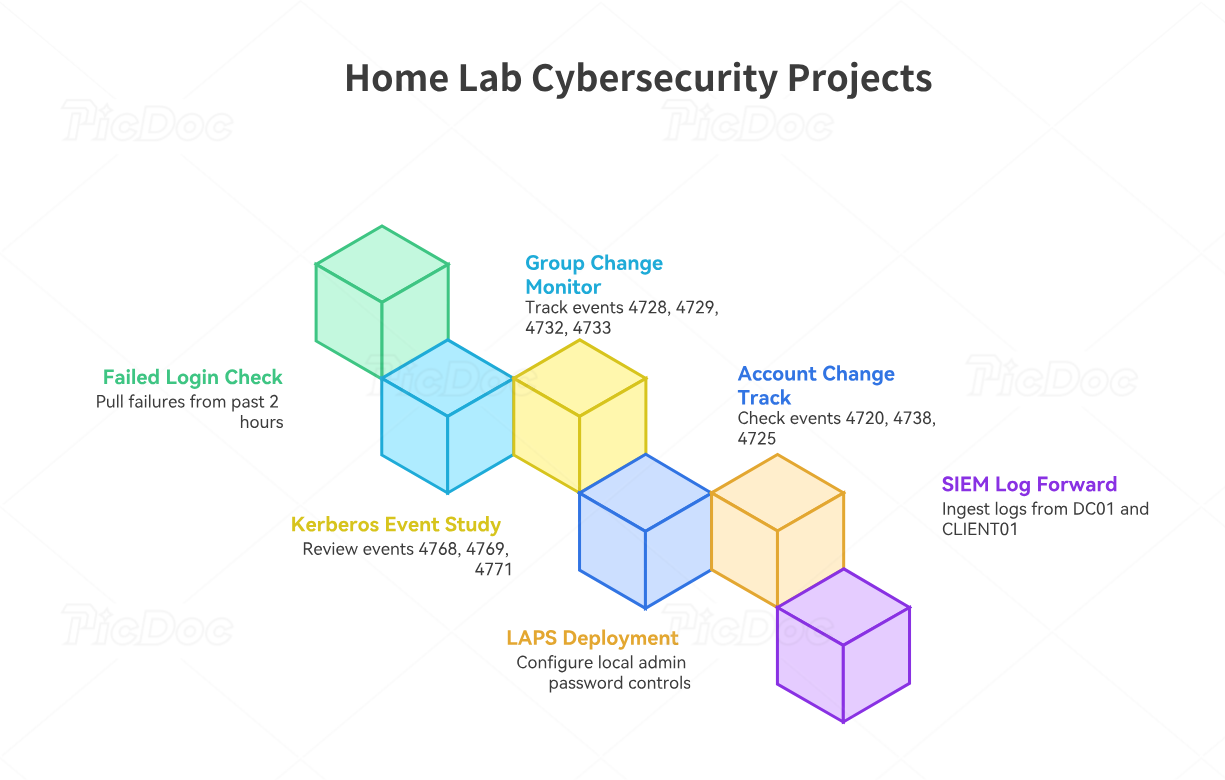
Project 1: Investigate Failed Logins and Account Lockouts
Objective: Determine whether repeated authentication failures represent a forgotten password, a stale credential, or suspicious account activity.
Use a standard lab account to generate a small number of incorrect-password attempts. Keep the experiment controlled and within your domain's lockout settings.
Open Event Viewer and inspect the Security log on the workstation receiving the logon attempt. Review Event ID 4625 where it is generated. If the domain account becomes locked, investigate Event ID 4740 on the domain controller.
For a PowerShell investigation on the relevant computer, use:
Get-WinEvent -FilterHashtable @{
  LogName = "Security"
  Id = 4625
  StartTime = (Get-Date).AddHours(-2)
} | Select-Object TimeCreated, Id, Message
This retrieves matching failures from the last two hours, assuming the event was generated and retained.
Investigation: Identify the affected username, source information, logon type, failure status, and relevant timestamps. Explain how failed interactive sign-ins differ from failed network authentication.
Deliverable: A chronological authentication investigation with raw-event evidence and a conclusion explaining why the behavior was or was not suspicious.
This supports beginner SOC projects and interview preparation.
Project 2: Monitor Sensitive Security Group Membership Changes
Objective: Identify when an account receives or loses membership in a security group.
Create a dedicated test group and assign a second account the authority to manage that group in the isolated lab. Add and remove a harmless test user, then review the corresponding security events.
For a security-enabled global group, Event ID 4728 indicates a member was added and 4729 indicates a member was removed. Domain-local groups use different event IDs, including 4732 and 4733.
Record the actor, target member, affected group, and timestamp.
Investigation: Compare the change with the expected administrative task and determine whether the initiating identity had legitimate authority.
A role membership change deserves additional scrutiny when it affects sensitive groups such as Domain Admins. Preserve a distinction between a privileged group change and an ordinary team membership update.
Deliverable: A privilege-change monitoring report, group membership timeline, and escalation checklist. These provide relevant evidence for IAM security roles, cybersecurity auditing, and SOC detection portfolios.
Project 3: Analyze Kerberos Authentication Events
Objective: Understand how domain authentication activity appears in domain controller security logs.
Generate normal domain sign-ins and authenticated access to a lab resource. Inspect Events 4768 and 4769 on DC01 after enabling the appropriate audit policies.
Event 4768 concerns Kerberos authentication ticket requests, while Event 4769 concerns service ticket requests. Event 4771 records Kerberos preauthentication failures when the corresponding conditions and auditing are present.
Investigation: Identify the requesting account, relevant service, source information, ticket outcomes, and event sequence.
High volumes of Kerberos events can be normal in an Active Directory environment. Establish expected behavior before creating anomaly thresholds.
Deliverable: A Kerberos authentication timeline explaining which events were observed and what they establish about user or service activity.
This project introduces concepts relevant to advanced SOC investigations and security analyst career development.
Project 4: Detect Account Creation and Administrative Changes
Objective: Track changes to domain user accounts and determine whether they were authorized.
Create a dedicated test user, change an account property, then disable the account through ADUC.
Investigate Events 4720 for account creation, 4738 for certain account changes, and 4725 for account disabling, assuming the applicable auditing is configured.
Investigation: Identify the account performing the action, the account affected, the timing, and the expected approval. Compare the events against a simple change log that you maintain during the test.
Deliverable: An account-lifecycle report documenting the identity change, expected result, observed event, and security implications.
This project aligns with identity management career pathways, security policy analysis, and risk management responsibilities.
Project 5: Implement Windows LAPS for Local Administrator Security
Objective: Demonstrate centralized management of a workstation's local administrator password and appropriate restrictions on password retrieval.
Windows Local Administrator Password Solution (Windows LAPS) can manage and rotate supported local administrator passwords and back them up to Windows Server Active Directory.
For AD-based backup, first review the required schema, permissions, and policy prerequisites. A properly authorized administrator can extend the lab forest's schema using:
Update-LapsADSchemaGrant the target workstation OU the required self-permission:
Set-LapsADComputerSelfPermission `
  -Identity "OU=LabWorkstations,DC=ad,DC=lab,DC=test"
Then configure the Windows LAPS Group Policy settings under Computer Configuration → Policies → Administrative Templates → System → LAPS.
Select Windows Server Active Directory as the backup directory, configure appropriate password settings, and verify that the workstation successfully processes the policy.
Test password retrieval using an appropriately authorized account, and verify that an ordinary user cannot retrieve the protected information.
Deliverable: A Windows LAPS implementation report containing policy settings, backup verification, access-control testing, and a sanitized description of password rotation. Exclude actual recovered passwords from screenshots.
This demonstrates concrete skills for identity administration, IT security operations, and security engineering portfolios.
Project 6: Forward Active Directory Logs Into a SIEM
Objective: Build a centralized investigation workflow using Windows Security logs from the domain controller and workstation.
Choose Splunk, Wazuh, or Elastic according to available hardware, license conditions, and the skills requested in your target job descriptions.
Configure appropriate log collection and confirm that the SIEM receives selected events from both DC01 and CLIENT01.
Normalize or verify the fields that identify the event code, host, target account, actor, source address, and time.
For example, with Splunk and a dataset containing the EventCode field, use:
index=ad_lab (EventCode=4625 OR EventCode=4740)
| stats count by host EventCode
| sort -count
Use your actual index name and validate field extraction before interpreting the results.
The search summarizes matching authentication failures and account lockouts. For a full investigation, inspect individual events and correlate the identities and timestamps.
Deliverable: A SIEM dashboard, two documented searches, a small labeled test dataset, and an incident investigation demonstrating a reproducible result.
This is particularly useful for candidates preparing Splunk SOC projects, entry-level analyst resumes, and SOC interview investigations.
5) A 30-Day Active Directory Home Lab Roadmap and Troubleshooting Guide
A structured learning plan helps beginners develop technical confidence while creating evidence they can reuse during job applications. The following roadmap prioritizes working infrastructure, security validation, and practical investigation.
It is particularly useful for candidates following a cybersecurity career-change roadmap or attempting to overcome entry-level experience requirements.
Week 1: Deploy the Domain and Verify Authentication
Install Windows Server, create the AD forest, configure DNS, and join the Windows workstation.
Spend additional time understanding how DNS service records, domain discovery, and Kerberos authentication interact.
Practice diagnosing intentionally introduced configuration errors, such as pointing CLIENT01 at the wrong DNS server. Restore the correct configuration and document the troubleshooting process.
End-of-week evidence: A functioning domain, domain-joined workstation, network diagram, and DNS verification results.
This provides foundational experience for networking and security roles and beginner cybersecurity home labs.
Week 2: Configure Identity Management and Security Policies
Create organizational units, standard user accounts, and role-based security groups.
Implement a workstation GPO and verify its application. Test resource permissions using authorized and unauthorized accounts.
Learn to distinguish domain administrators, ordinary domain users, local administrators, and delegated administrators. These identities have different responsibilities and security implications.
Use Windows LAPS as an optional advanced exercise after the foundational configuration is stable.
End-of-week evidence: Documented security groups, access tests, Group Policy reports, and an explanation of least-privilege administration.
This work is relevant for IAM career preparation, GRC specialist roles, and security risk assessments.
Week 3: Build and Validate Security Monitoring
Enable the relevant audit policies and complete controlled authentication and directory-change exercises.
Collect failed sign-in events, account-creation events, and security group changes. Where available, investigate Kerberos authentication records.
Develop a consistent investigation method:
Identify the alert or suspicious event.
Confirm which computer generated it.
Identify the actor and affected identity.
Establish the relevant event timeline.
Investigate expected administrative behavior.
Document a reasoned conclusion and recommended action.
Create sanitized evidence for each exercise and record the audit settings required to reproduce it.
End-of-week evidence: Three investigation records with timestamps, raw-event screenshots, relevant fields, and analyst conclusions.
These activities support hands-on SOC analyst readiness, cybersecurity certification preparation, and technical interview practice.
Week 4: Create a Complete Incident Investigation and Portfolio
Select one controlled incident scenario involving an account lockout, unexpected group membership change, or another observable identity event.
Preserve the relevant Windows Security logs and collect supporting evidence from the directory, workstation, and SIEM if deployed.
Produce a professional incident case study with these components:
Investigation objective and test scenario.
Network architecture and affected systems.
Relevant security event IDs and original timestamps.
Evidence connecting the actions to the test account.
Expected versus observed security behavior.
Alternative explanations and monitoring limitations.
Investigation conclusion and recommended response.
Then prepare a short technical demonstration.
Aim to explain the incident in five minutes, including what happened, how you validated the evidence, and which additional information would be needed in a real organization.
End-of-week evidence: One complete Active Directory incident case study and at least three smaller documented exercises.
This collection can support cybersecurity portfolio development, improve an entry-level SOC resume, and provide meaningful examples for security analyst interviews.
Troubleshooting: Five Common Active Directory Lab Failures
1. The workstation cannot find the domain controller. Check its DNS server, domain controller IP address, SRV records, and network connectivity. Use nltest /dsgetdc:ad.lab.test to verify domain discovery. Review netsetup.log if domain joining fails.
2. Domain authentication fails despite correct credentials. Check account status, password expiration, time synchronization, and the applicable authentication method. Kerberos is sensitive to clock differences. Use w32tm /query /status to inspect time service status.
3. Group Policy changes never appear on CLIENT01. Confirm the computer account belongs to the correct OU. Review GPO linking, inheritance, security filtering, and policy processing. Use gpresult to identify applied and denied GPOs.
4. Security events are missing from Event Viewer. Check whether the expected audit subcategory is enabled and whether the action occurred on the machine whose logs you are inspecting. Use auditpol /get /category:* to review effective audit configuration. Some directory modification events also require object-level auditing through a System Access Control List (SACL).
5. The environment stops working after restoring a snapshot. Snapshots are useful for short-lived isolated lab experiments, but reverting domain controllers requires caution. In environments with multiple domain controllers, careless restoration can cause directory consistency and replication problems. For production-style recovery exercises, use supported Active Directory backup and restore procedures.
Documenting failures and their resolutions can strengthen IT-to-security career applications and help candidates demonstrate the troubleshooting competence expected in technical cybersecurity interviews.
Turn Your Lab Into a Strong Resume Entry
A weak portfolio description might say, "Installed Active Directory and created users."
A stronger, evidence-based description would be:
Built an isolated Windows Server Active Directory environment with a domain-joined Windows workstation, configured organizational units and security policies, and investigated authentication failures and security group changes using Windows Security event logs.
If you successfully integrated a SIEM, document that work separately and describe the actual detections you implemented.
For example:
Collected Active Directory security telemetry into a SIEM, developed authentication and privilege-change investigations, and documented event correlation, test scenarios, and limitations.
These statements should reflect the work you actually completed. Link the relevant case studies in your ATS-focused cybersecurity resume, include relevant portfolio project documentation, and prepare to reproduce your findings in practical SOC assessments.
6) FAQs: Active Directory Home Labs for Cybersecurity Beginners
-
Yes. Start with basic Windows administration, IP addressing, DNS, virtual machines, and user authentication.
Understanding these foundations makes domain controller configuration and troubleshooting more manageable.
Candidates following a cybersecurity roadmap without experience should begin with one domain controller and one workstation.
Build confidence through beginner SOC lab exercises before expanding into advanced cybersecurity portfolio projects.
-
A host computer with 16 GB RAM can support a basic two-VM environment when resources are carefully allocated. With 24–32 GB RAM, there is more room for monitoring software and additional virtual machines.
Windows Server and the client workstation require memory for their operating systems, background services, and security tools.
For a limited-hardware cybersecurity home lab, begin with domain authentication and event analysis before introducing a full SIEM.
Measure actual resource usage before expanding your SOC monitoring environment.
-
Yes. Active Directory remains highly relevant in many organizations, and understanding domain authentication helps analysts interpret security events involving users, computers, and privileged groups.
SOC analysts may investigate failed logons, account lockouts, suspicious permission changes, and unusual Kerberos activity.
Candidates preparing for entry-level SOC opportunities can use an AD lab to practice those investigations.
Pair the lab with SOC interview questions and hands-on defensive security training.
-
Learning basic Active Directory administration and authentication first can make SIEM investigations easier to understand.
When you recognize the difference between account logon events, Kerberos ticket requests, and directory changes, you can construct more meaningful detection logic.
For beginner cybersecurity portfolio projects, begin with event collection and native Windows investigation tools.
Then use your preferred SIEM to centralize and correlate activity.
This provides a useful progression toward SOC analyst technical proficiency and security automation engineering.
-
Begin with the defensive indicators associated with password guessing, password spraying, suspicious account creation, unauthorized security group changes, and credential-related authentication anomalies.
Learn how each activity might appear in Windows Security logs and what benign circumstances could produce similar patterns.
For example, repeated failed authentication attempts may indicate incorrect saved credentials or potentially hostile behavior. Privileged group changes require investigation of the initiating account and approval context.
These skills strengthen SOC investigation projects, practical blue-team certification preparation, and technical security assessments.
Conduct experiments only within systems you own or are authorized to test.
-
Microsoft provides Windows Server evaluation editions for testing and learning.
The Windows Server 2025 evaluation is time-limited to 180 days, with activation required within the initial activation window. Verify the current terms before installation.
For the workstation, use a properly licensed Windows edition that supports traditional Active Directory domain joining, such as Windows 11 Pro or Enterprise.
An evaluation environment can provide practical experience for cybersecurity career changers and candidates building security project portfolios.
