
Top Cybersecurity Providers for Nonprofits: Comprehensive Directory
Nonprofits do not lose to cyberattacks only because attackers are sophisticated. They lose because lean teams are forced to protect donor records, grant systems, volunteer accounts, payment workflows, beneficiary data, cloud files, and public-facing websites with limited budget, thin staffing, and too many disconnected tools. That is exactly why provider selection matters more in the nonprofit sector than it does in many larger enterprises.
This directory is built to solve that problem. It does not just name vendors. It shows which cybersecurity providers are worth shortlisting based on nonprofit realities: identity sprawl, phishing exposure, small IT teams, board pressure, fundraising downtime risk, and the need for controls that are practical, affordable, and supportable. Broad cyber hygiene guidance from CISA, nonprofit offers from Microsoft and Google, nonprofit-focused programs from Okta and 1Password, and nonprofit security access through TechSoup all reinforce the same point: nonprofits need strong security, but they need it in forms they can actually adopt and sustain.
1) What nonprofits should demand from a cybersecurity provider
A nonprofit should never buy security the way a large enterprise buys security. Enterprise buying often assumes deeper in-house expertise, larger admin teams, broader integration budgets, and more tolerance for long deployments. Nonprofits usually need the opposite: fast time to value, lighter administration, clearer visibility, strong default settings, useful reporting, and support that does not assume a 20-person security department. That is why teams comparing providers should frame decisions around operational pain, not brand recognition. If your biggest exposure is account compromise, the answer may lean toward identity and access control models. If your biggest pain is weak detection and delayed response, a stronger SIEM strategy, tighter incident response plan, or more practical intrusion detection systems may matter more than another point product.
The strongest nonprofit providers usually help in five areas at once. First, they reduce the chance of credential theft and privilege abuse. Second, they improve endpoint, email, and cloud visibility without demanding advanced engineering just to get started. Third, they make staff behavior safer through simpler controls and better awareness training. Fourth, they help leadership explain risk in plain language, which aligns naturally with stronger security audits, clearer cybersecurity frameworks, and more disciplined vulnerability assessment techniques. Fifth, they fit the nonprofit budget reality instead of pretending budget does not matter.
That last point is where many nonprofit teams get burned. They buy “best-in-class” tools that look impressive in demos but quietly create new pain: license complexity, alert noise, onboarding drag, consultant dependency, or controls nobody owns after deployment. A provider becomes valuable only when it strengthens resilience inside the actual operating conditions of the organization. For nonprofits under persistent phishing pressure, donor-data risk, ransomware concern, and public-facing site exposure, that means looking closely at secure collaboration offers from Microsoft and Google, identity support for nonprofits from Okta, password security support from 1Password, public-interest protection from Cloudflare, and nonprofit-accessible tools and services through TechSoup.
| Provider | Best Fit for Nonprofits | Primary Strength | Why It Makes the Shortlist |
|---|---|---|---|
| Microsoft | M365-heavy nonprofits | Identity, email, endpoint, data protection | Strong nonprofit ecosystem, familiar admin model, layered security path |
| Google Workspace | Cloud-first nonprofits | Secure collaboration and admin controls | Strong for distributed staff and volunteer environments |
| Okta | Identity-chaos environments | SSO, lifecycle, authentication | Helps tame account sprawl across many apps |
| 1Password | Lean teams with password risk | Secrets and credential hygiene | Easy win for reducing unsafe password sharing |
| Cloudflare | Public-facing nonprofits and advocacy groups | Website, DNS, DDoS, edge protection | High value where website uptime and attack absorption matter |
| Cisco | Networking-heavy nonprofits | Network security and infrastructure | Strong fit for mature network-led environments |
| Cisco Duo | Fast MFA rollouts | Access protection | Useful when account compromise is the biggest pain |
| CrowdStrike | Mission-critical endpoint visibility | EDR/XDR | Good where security maturity can support deeper telemetry |
| SentinelOne | Endpoint-focused teams | Autonomous endpoint defense | Strong shortlist candidate for response-minded buyers |
| Sophos | Resource-constrained SMB-style nonprofits | Managed protection and endpoint security | Often appealing where simplicity matters |
| Huntress | Very lean teams | Managed threat detection | Attractive for organizations that need strong help, not just software |
| Fortinet | Firewall-centric environments | Network security stack | Strong where perimeter and branch security still matter heavily |
| Palo Alto Networks | Complex hybrid environments | Platform depth across network and cloud | Useful when nonprofit operations resemble midmarket enterprise complexity |
| Proofpoint | Email-risk-heavy nonprofits | Email security and human-centric defense | Good where phishing is a constant operational problem |
| Mimecast | Microsoft-email-heavy environments | Email filtering and continuity | Strong for inbox protection and continuity concerns |
| Barracuda | Budget-sensitive email and backup needs | Email, backup, app protection | Often practical for broad protection with manageable complexity |
| KnowBe4 | High phishing susceptibility | Security awareness training | Useful when human error is still the easiest way in |
| Tenable | Visibility-driven teams | Exposure and vulnerability management | Helpful when asset visibility is weak and patching is reactive |
| Qualys | Compliance-aware environments | Vulnerability and asset intelligence | Strong for structured scanning and risk tracking |
| Rapid7 | Balanced security operations teams | Vulnerability management and detection | Good crossover option between exposure and operations |
| Arctic Wolf | Teams needing guided operations | Managed detection and response | Appealing where internal SOC capability is limited |
| Zscaler | Remote and hybrid workforces | Zero trust access and secure internet access | Good for nonprofits with distributed users and cloud-first access patterns |
| Jamf | Apple-heavy organizations | Apple device management and security | Valuable when Mac and iOS fleets are core to operations |
| Keeper | Password cleanup initiatives | Password and secrets management | Useful if unsafe credential storage is widespread |
| Acronis | Backup-conscious small nonprofits | Cyber protection and recovery | Good when recovery maturity is a visible weakness |
| TechSoup | Organizations needing access and discounts | Procurement channel and services gateway | Critical shortlist enabler for nonprofit-accessible security tools |
2) Top cybersecurity providers for nonprofits: how to shortlist by real need
The fastest way to ruin a nonprofit cybersecurity budget is to compare providers as if they all solve the same problem. They do not. Microsoft and Google often sit at the center because collaboration suites shape identity, email, file access, device policy, and admin workflows. Microsoft’s nonprofit offers include Microsoft 365 security-oriented options and discounted Defender and Purview suites for eligible nonprofits, while Google’s nonprofit program emphasizes secure collaboration, centralized administration, and no-cost Workspace access for eligible organizations. That makes both especially important for nonprofits where email compromise, document exposure, and staff-device inconsistency create daily risk.
Identity-focused nonprofits should push Okta and similar access-layer providers higher on the list. Nonprofits tend to accumulate SaaS accounts, volunteer accounts, contractor access, temporary campaigns, board-level permissions, and shared operational logins much faster than they clean them up. That creates quiet privilege drift. A serious identity layer helps reduce the sprawl that later turns into breach headlines, which is why this buying decision should connect naturally to better public key infrastructure, stronger virtual private network security thinking, improved encryption standards, and more future-ready zero trust planning. Okta’s nonprofit program exists because identity weakness is one of the most expensive nonprofit problems to leave unresolved.
Password security and public-facing website protection deserve their own nonprofit lens. A surprising number of nonprofits still leak risk through unsafe password sharing, weak volunteer offboarding, reused admin credentials, or websites that are mission-critical but underprotected. That is why 1Password and Cloudflare belong in more nonprofit discussions than they often get. 1Password explicitly provides nonprofit support options, while Cloudflare’s Project Galileo offers free security services to qualifying organizations supporting the arts, human rights, journalism, and democracy; Cloudflare reported that Project Galileo protections blocked 108.9 billion threats over a recent reporting period. For advocacy groups, journalism-supporting nonprofits, and public-interest organizations that can be targeted online, that changes the conversation from “Can we afford resilience?” to “Can we afford not to pursue specialized protection?”
TechSoup also matters far more than many buyers realize. It is not just a discount site. It is a practical access layer for nonprofits that need discounted security products, technology services, and a path into tools that might otherwise never reach budget approval. Its catalog includes security products and services, and its membership materials describe access to donations and discounts across a wide range of technology categories. For nonprofits that are trying to combine email security solutions, better endpoint detection and response tools, stronger vulnerability scanners, and smarter managed security service provider options, TechSoup often becomes the bridge between strategy and affordability.
3) Which provider categories matter most for different nonprofit risk profiles
A donor-funded education nonprofit has a different attack surface from a human-rights organization, and both differ from a healthcare-adjacent charity, a grantmaking foundation, or a regional nonprofit with dozens of remote staff and a tiny IT function. That is why the better question is not “Who is the best provider?” but “Which provider category closes our most damaging gap first?” If phishing dominates your incident history, prioritize email security, identity, and awareness training. If uptime and public visibility dominate the risk conversation, prioritize web protection, DNS resilience, and recovery strength. If endpoint uncertainty is the real issue, focus on managed detection, endpoint telemetry, and practical data loss prevention strategies that stop sensitive information from moving carelessly across devices and cloud storage.
For very lean nonprofits, the best-fit providers usually share one trait: they reduce the need for in-house heroics. That makes Microsoft, Google, Huntress, Sophos, and selected MSSP-style options more attractive than tools that assume deep engineering coverage. Huntress positions itself around a managed security platform backed by a 24/7 SOC, while Sophos emphasizes scalable protection backed by experts. Those kinds of models matter when the internal team cannot babysit dashboards all day. They also support a smarter path into remote cybersecurity career trends, future skills for cybersecurity professionals, and better alignment with specialized cybersecurity roles, because they expose where external support is useful and where internal capability must still grow.
For nonprofits facing stronger public targeting, web-layer and identity-layer investments often outrank everything else. A compromised fundraiser inbox hurts, but a taken-down site during a major campaign or coordinated abuse against a public-interest organization can cripple operations and trust simultaneously. In those environments, provider selection should reflect lessons already visible in broader future threat analysis, deepfake threat preparation, ransomware response and recovery, and future compliance pressure. Nonprofits do not need enterprise extravagance. They need control placement that matches how they are actually attacked.
4) How nonprofits should evaluate providers without overspending
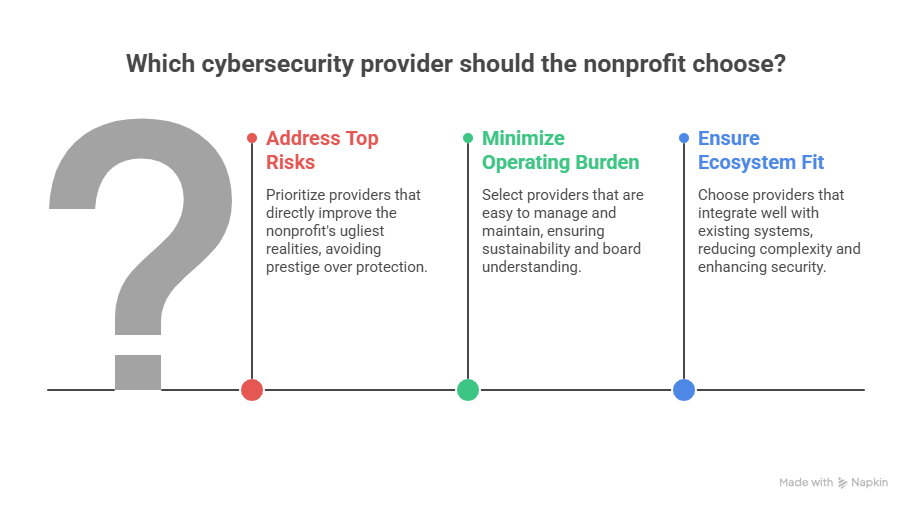
Start with a one-page decision matrix, not a vendor demo. List your five ugliest realities: maybe it is MFA inconsistency, no real offboarding discipline, weak website resilience, poor asset visibility, unclear recovery readiness, or staff training that exists only on paper. Then score every provider against those realities. A product that looks amazing in generic analyst language but does not clearly improve your top risks should lose points immediately. That is how nonprofits avoid buying for prestige instead of protection.
The second filter is operating burden. Ask brutal questions. Who will own this daily? Who will tune it? Who will review alerts? What breaks when the internal admin leaves? How long until it meaningfully lowers risk? Can the board understand its value? Does it improve audit readiness and policy discipline, or does it just add one more pane of glass? These questions align directly with more resilient cybersecurity audit practices, stronger future cybersecurity standards, and more realistic small-business cybersecurity legislation impact planning, because nonprofit security failure is often a governance failure disguised as a tooling problem.
The third filter is ecosystem fit. Microsoft-heavy nonprofits usually get the most leverage when they build outward from Microsoft security controls before layering unrelated products. Google-heavy nonprofits should ask the same question inside Google’s admin and collaboration model. Identity-first environments should make sure email, endpoint, and SaaS visibility all reinforce access security instead of fragmenting it. The more providers you add, the more operational discipline you need. For smaller nonprofits, fewer integrated wins usually beat larger fragmented promises.
5) The most common mistakes nonprofits make when choosing cybersecurity providers
The first mistake is buying tools before defining a threat model. A nonprofit that primarily fears website disruption, donor-platform downtime, and public trust damage should not buy as if it were a Fortune 500 SOC trying to optimize detection engineering at enormous scale. It needs durable web protection, tighter identity, clean backups, strong email controls, and a workable response plan. The second mistake is underestimating human risk. Tech alone cannot save a nonprofit whose users still share passwords, approve strange login prompts, or treat volunteer offboarding casually. That is why security buying should always sit beside cyber threat intelligence, botnet disruption awareness, denial-of-service mitigation, and practical security awareness improvement.
The third mistake is confusing affordability with value. Cheap tools can be expensive if they create blind spots, and premium tools can be wasteful if they exceed the organization’s ability to implement them. Value lives in reduction of exposure, simplification of operations, and resilience under stress. The best nonprofit provider is not always the most powerful platform. It is the one that gives your team the clearest control over the risks most likely to interrupt fundraising, beneficiary service, staff productivity, or mission trust.
6) FAQs
-
There is no universal winner, but Microsoft and Google usually deserve first review because collaboration platforms shape identity, email, files, device access, and admin policy. For many nonprofits, those environments create the foundation that later determines whether extra security tools help or just add clutter. Microsoft and Google both maintain nonprofit-specific offerings.
-
Okta is one of the clearest shortlist candidates when nonprofit risk is being driven by account sprawl, complicated app access, volunteer turnover, and weak authentication discipline. Its nonprofit program is specifically oriented toward helping nonprofits strengthen secure access.
-
Cloudflare deserves strong attention, especially for nonprofits with public-facing sites, advocacy exposure, or campaign-driven traffic sensitivity. Project Galileo is especially relevant for qualifying at-risk public-interest organizations because it offers free security services and has reported large-scale threat blocking.
-
Yes. TechSoup is one of the most practical channels because it provides access to discounted or donated security products and related technology services for eligible nonprofits. Microsoft also offers nonprofit discounts on key security suites, and 1Password offers nonprofit support options.
-
If phishing and unsafe user behavior are already driving incidents, awareness training should move up quickly, but it should not stand alone. The strongest approach combines awareness, identity controls, email filtering, and recovery planning. TechSoup lists discounted KnowBe4 training options for nonprofits, which makes awareness training more accessible when budget is tight.
-
Treating cybersecurity as a product-shopping exercise instead of an operating-risk decision. Nonprofits get the best results when they buy according to the few failures that would hurt them most: donor data exposure, account compromise, fundraiser downtime, website disruption, or inability to recover quickly after an incident.
